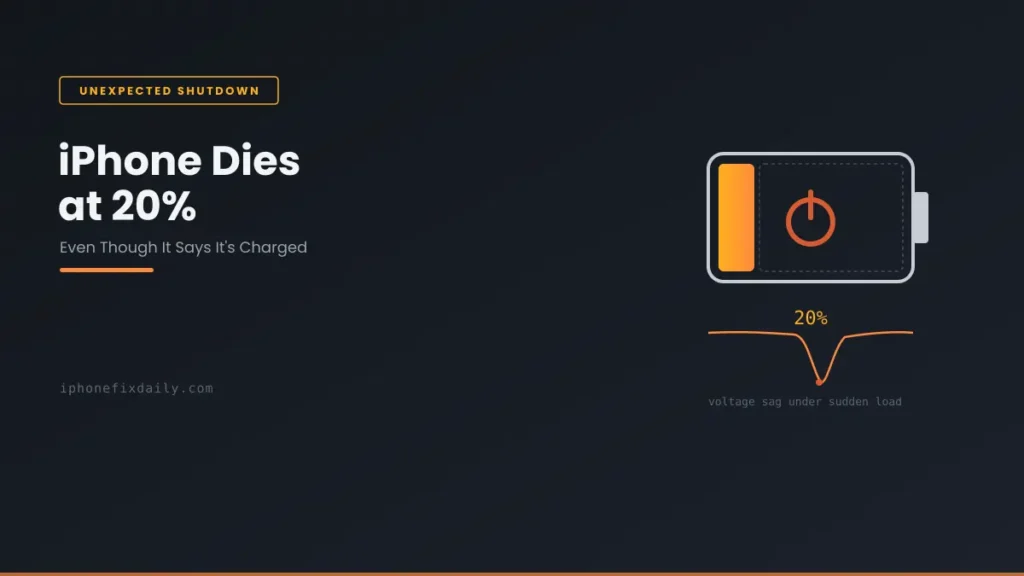
Why does my iPhone die at 20 percent? Usually because an aging battery can’t deliver a sudden burst of power. The voltage drops and iOS shuts the phone down to protect it, even though charge remains. To confirm, go to Settings → Battery → Battery Health & Charging. If Maximum Capacity is below 80%, or Peak Performance Capability shows a message, the battery is the cause. Cold weather and the occasional iOS bug can trigger the same shutdown, and the same thing can happen at 10%, 30% or even higher. Here’s how to tell which one you’re dealing with.
Official Apple Store on Amazon
Genuine cases, cables, and accessories — sold and shipped by Apple.
🎧 LISTEN TO THIS GUIDE
~2 min listen
📋 Quick Summary
- An iPhone dying at 20% (or higher) usually means the battery can’t deliver a sudden power spike — not that it’s actually out of charge.
- Check Settings → Battery → Battery Health & Charging → Peak Performance Capability first — it’s the fastest diagnostic.
- If Maximum Capacity is below 80%, an aging battery is very likely your direct answer.
- Cold weather (below Apple’s official 32°F operating range) can cause the identical symptom on a perfectly healthy battery.
- Healthy battery + updated iOS + not cold + still happening repeatedly points toward a hardware issue, not something to keep troubleshooting solo.
Found your battery health % in Settings → Battery → Battery Health? Check what it means.
Open the full iPhone Battery Health Checker →
iPhone Dies at 20 Percent: Why This Happens
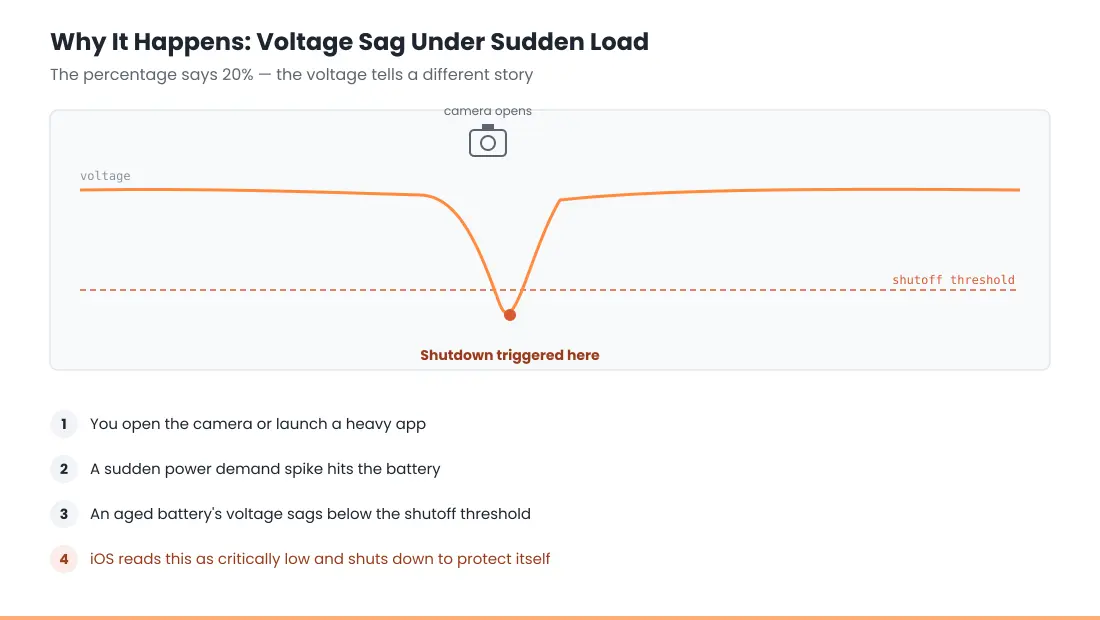
As a lithium-ion battery ages, its internal resistance increases. Most of the time this isn’t noticeable — but the moment your phone demands a sudden burst of power (opening the camera, launching a graphics-heavy app, taking a photo with the flash), an aged battery can experience a temporary voltage drop it can’t recover from fast enough. iOS interprets that voltage sag as the battery being critically low and shuts the phone down to protect itself, even though the percentage reading — based on remaining capacity, not moment-to-moment voltage — still shows a healthy number.
Check This One Setting First
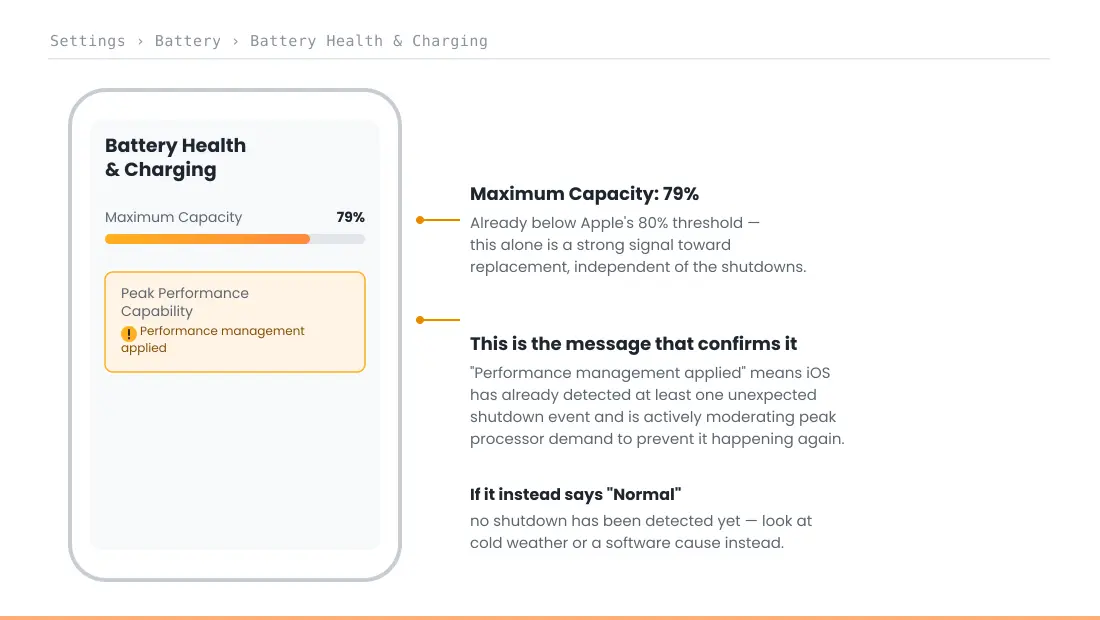
Go to Settings → Battery → Battery Health & Charging and look at Peak Performance Capability. This is the exact feature Apple introduced specifically to address this issue. If it reads “Your battery is currently supporting normal peak performance,” your phone hasn’t detected the pattern yet. If it shows a note about performance management being applied, that’s Apple’s own system confirming this has already happened at least once and iOS is actively working to prevent it from happening again by moderating peak processor demand.
Other Real Causes Besides an Aging Battery
Cold temperature. Apple’s official operating temperature range for iPhone is 32°F to 95°F (0°C to 35°C). Below that range, a lithium-ion battery’s ability to deliver current temporarily drops — this is basic battery chemistry, not a defect — and it’s a well-documented cause of exactly this symptom in cold weather, even on a battery that’s otherwise healthy.
A specific iOS software bug. This exact complaint has recurred across multiple, unrelated iOS versions over the years — iOS 10.1.1 caused shutdowns at 30% for some users, and similar reports have surfaced around iOS 17 and 18 releases. When it’s software-related, it typically affects a specific iOS version and gets patched in a subsequent update.
A rare hardware or connector issue. Less common, but a battery connector or logic board fault can produce the same symptom. This is the scenario where the fixes below won’t resolve it and professional diagnosis becomes the right next step.
What to Do, In Order
- Check Peak Performance Capability as described above.
- Check Settings → General → Software Update — if there’s a pending update, install it, since this exact symptom has been patched via software before.
- If the shutdowns correlate with cold weather (outdoors in winter, a cold car), warm the phone to room temperature and test again before assuming it’s the battery.
- Check Maximum Capacity. If it’s below 80%, this is very likely just your answer — an aged battery, not a bug, and replacement is the direct fix.
- If Maximum Capacity is healthy, iOS is fully updated, and it’s not a temperature issue, and shutdowns are still happening repeatedly — that combination points toward a hardware issue worth professional diagnosis rather than more troubleshooting.
If you’re currently running an iOS 27 beta, be aware this is pre-release software still being refined — unexpected shutdowns during a beta period are less conclusive evidence of a hardware issue than the same pattern on a stable release.
Match Your Situation
| Your situation | Likely cause | What to do |
|---|---|---|
| Maximum Capacity below 80% | Aging battery, reduced peak current delivery | Battery replacement |
| Happens mainly in cold weather | Temporary cold-weather voltage drop | Warm the device; not a fault |
| Started right after an iOS update | Possible software bug | Check for a follow-up update |
| Peak Performance Capability shows a note | Confirmed prior shutdown event | Treat as a strong signal toward replacement |
| Healthy battery, updated iOS, still happens | Possible hardware/connector fault | Professional diagnosis |
A note on scope: if you notice any physical swelling alongside these shutdowns, that’s a separate and more urgent issue — see the safety guidance in our main battery and charging guide and do not attempt to open the device yourself.
RECOMMENDED FIRST STEP
Check one setting before assuming the worst
Settings → Battery → Battery Health & Charging → Peak Performance Capability tells you in seconds whether this has already been flagged.
See the Full Battery & Charging GuideFeatured Apple Deals on Amazon
Current discounts on AirPods, chargers, cables, and other Apple gear.
Frequently Asked Questions
Why does my iPhone die at 20 percent even though it says it’s not dead?
An aged battery can experience a brief voltage drop when your phone suddenly demands more power than usual, which iOS interprets as critically low even though remaining capacity still shows a higher number.
Is this the same as the old iPhone “batterygate” issue?
It’s the same underlying mechanism — aged batteries struggling to deliver peak current — that Apple’s Peak Performance Capability and performance management features were specifically built to detect and manage.
Does cold weather really cause an iPhone to shut down early?
Yes. Apple’s official operating range is 32°F to 95°F; below that, a lithium-ion battery temporarily delivers less current, which can trigger the same kind of shutdown even on a healthy battery.
Will replacing my battery definitely fix this?
If Maximum Capacity is below 80%, replacement resolves the underlying cause in the vast majority of cases. If Maximum Capacity is still healthy, the cause is more likely software or, rarely, hardware — replacement wouldn’t be the right first step.
Can a software update fix random shutdowns?
Yes — this exact symptom has been introduced and subsequently patched by specific iOS versions before, so checking for a pending update is a legitimate troubleshooting step, not just a generic suggestion.
Does this mean my battery is dangerous?
Not on its own. A battery triggering a protective shutdown is your phone doing exactly what it’s designed to do. It becomes a safety concern specifically if you also notice physical swelling — that’s a different, more urgent situation covered separately in our main guide.
Will calibrating the battery fix it?
No. Calibration (draining to 0% and charging to 100%) can only correct an inaccurate percentage reading. It can’t fix a worn battery’s voltage drop under load, which is what causes these shutdowns.
How much does it cost to replace an iPhone battery?
It depends on your model and where you get it done. Get a rough price range for your iPhone with our Repair Cost Estimator, and check whether you’re still covered by AppleCare+ first.
📚 Related Guides
Written by S M Momin Arif
Founder and lead writer at iPhoneFixDaily, covering iPhone battery and charging diagnostics based on direct hands-on testing. Read more about our approach →