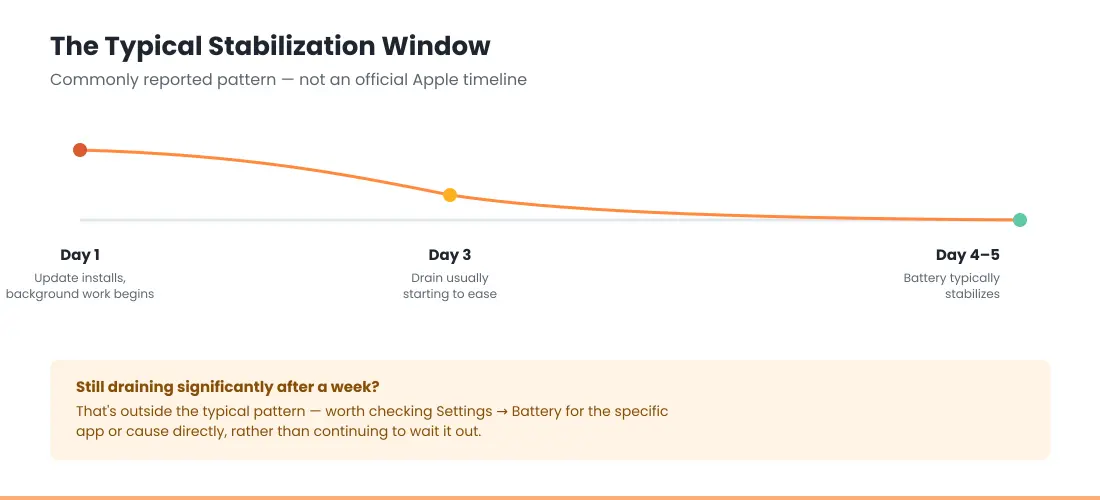
If your battery has been draining faster since updating to iOS 26.6, it’s almost always temporary background work — the indexing and app optimization that runs after every update — not a fault. It commonly settles within about 4–5 days (a widely reported pattern, not an Apple figure). To help it along, charge overnight and check Settings → Battery for the “Ongoing iOS Update” insight; if the drain hasn’t improved after a week, work through the steps below.
📱 Already updated to iOS 27? The causes and fixes are different.
See the iOS 27 battery drain fixes →Official Apple Store on Amazon
Genuine cases, cables, and accessories — sold and shipped by Apple.
🎧 LISTEN TO THIS GUIDE
~90 sec listen
📋 Quick Summary
- iOS 26.6 battery drain is real and currently being reported — consistent with nearly every iOS 26.x point release so far.
- Commonly reported stabilization window: roughly 4–5 days (not an official Apple figure, but a widely observed pattern).
- Confirm you’re on the stable release, not a beta — betas carry more bugs and can worsen drain.
- Severe drain or no improvement after a week points to something worth investigating directly, not more waiting.
- Overnight-specific, sudden-shutdown, or charging-specific symptoms may point to a separate cause entirely — see the related guides below.
Check the latest iOS version your iPhone can run and its update status.
Open the full iOS 27 Compatibility Checker →
What’s Actually Different About iOS 26.6
iOS 26.6 is a minor, incremental release rather than a major overhaul — largely a preparatory step ahead of iOS 27, which Apple has since released. That matters for expectations: minor releases still trigger the same background reindexing and optimization work as major ones, so battery drain isn’t limited to big iOS jumps. If you’ve dealt with post-update battery drain before, the same underlying mechanism applies here — this is simply the current version people are asking about. If what you’re actually seeing is drain concentrated overnight rather than tied to the update itself, that’s a distinct pattern with its own causes — see iPhone Battery Drains Overnight.
Does iOS 26.6.1 Cause the Same Battery Drain?
Apple released iOS 26.6.1 on August 17, 2026, and it’s a meaningfully different kind of update than iOS 26.6 was. Unlike iOS 26.6, which included Spotlight indexing changes that directly triggered the background-processing drain covered above, iOS 26.6.1 is a security-only patch — mostly WebKit fixes, along with Audio, ImageIO, and Kernel patches. No new features, no Spotlight or indexing changes.
That distinction matters for what to expect: since the drain from iOS 26.6 was tied specifically to Spotlight reindexing work, iOS 26.6.1 likely won’t trigger the same scale of temporary drain, even though any update can still cause some brief background optimization. If you update directly from 26.6 to 26.6.1, you may not notice a second drain period at all. If you’re updating from an older version straight to 26.6.1, you may experience a milder version of the same temporary pattern described above.
If you’ve already updated to iOS 27, that’s a distinct situation with its own causes — see iOS 27 Battery Drain.
🛠️ Gear We Recommend
Is This Just the Normal Post-Update Pattern?
For most people, yes. Apple’s own support documentation on battery drain explains that after an update, certain tasks related to the update continue in the background and might affect battery life and thermal performance. Some outlets tracking iOS 26.6 specifically have reported a stabilization window of roughly 4–5 days before battery behavior normalizes, though that figure isn’t an Apple-published number, just a commonly observed pattern.
Does iOS 26.6 Affect Overall Battery Life, Not Just Short-Term Drain?
Beyond the temporary post-update drain covered above, some people specifically ask whether iOS 26.6 affects battery life more permanently, rather than just the first few days after updating. There’s no evidence of that in Apple’s release notes or in the actual pattern of complaints being reported — the iOS 26.6 battery drain people are describing is consistently framed as temporary, tied to the same background-processing window covered above, not a lasting change to how your battery performs day to day. If your battery life still feels meaningfully worse a week or more after updating, that points to one of the causes covered in “When It’s More Than Just Temporary” below, not something inherent to iOS 26.6 itself.
When It’s More Than Just Temporary
If drain is severe — noticeably faster than before the update, not just marginally different — or hasn’t improved after a week or more, that’s worth treating as a separate issue rather than continued patience. A few specific patterns worth checking:
- If the drain is worst overnight specifically, see our guide on iPhone battery drains overnight — several causes there (weak signal, background refresh, an installed VPN profile) are unrelated to the iOS update itself and are worth ruling out.
- If your iPhone is shutting down unexpectedly while the percentage still shows charge remaining, that’s a different mechanism entirely — see iPhone dies at 20 percent for what’s actually happening there.
- If Home & Lock Screen is your top battery user in Settings → Battery, that’s usually a widget or a stuck background process, not the update. See Home & Lock Screen battery drain.
- If No Cell Coverage shows up near the top of your battery list, your iPhone is hunting for signal. See poor cell coverage draining iPhone battery.
- If charging itself feels affected, not just battery life, check whether it’s actually a port issue rather than the update — see iPhone charging port not working.
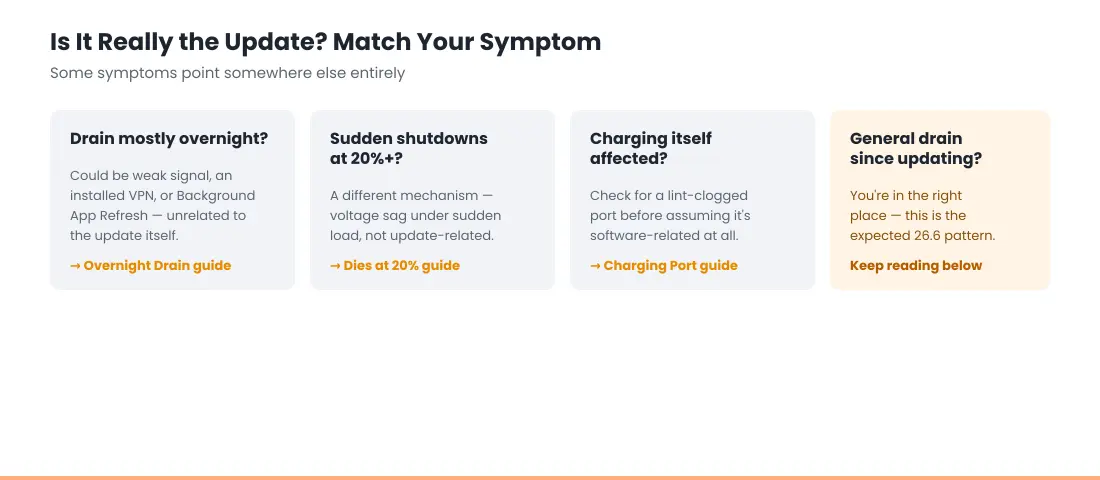
If it’s charging itself that’s affected rather than battery life — charging slowly, or not charging at all — those are separate issues with their own causes; see our guides on iPhone charging slowly and iPhone not charging when plugged in. and if you’re seeing a specific Slow Charger alert, see Slow Charger Message on iPhone.
What to Do Right Now
If you’re dealing with iOS 26.6 battery drain right now, here’s the order to work through:
- Confirm you’re on the official iOS 26.6 release, not a beta — beta versions carry more bugs and can make drain worse than the stable release will.
- Check Settings → Battery for an “Ongoing iOS Update” insight, confirming background work is still finishing. If that message has been showing for more than a week with no change, that’s no longer just the normal window — see Update Finishing in Background iPhone for what’s actually stuck versus what’s typical.
- Check per-app battery usage for anything unusually high, and make sure all your apps are updated to their latest versions, since app-side bugs can compound update-related drain. If the percentage is dropping suddenly or your phone shuts off with charge still showing, that’s a different problem — see why your iPhone dies at 20 percent.
- Keep your iPhone charged, ideally overnight, so background indexing can finish without competing with active use. If it’s taking far longer to charge than usual, check why your iPhone is charging slowly; if it isn’t charging at all, follow our iPhone not charging when plugged in steps.
If iOS 26.6 battery drain continues well beyond that stabilization window, the next step is figuring out which specific cause applies to you.
A note on scope: this covers software-related drain only. If you notice any physical swelling or a bulging back panel, that’s a separate, more urgent issue — see the full safety guidance in our main iPhone Battery and Charging Problems guide and do not attempt to open the device yourself.
RECOMMENDED FIRST STEP
Confirm you’re on the stable release
Settings → General → Software Update. If you were on a beta, switching to stable resolves a meaningful share of these reports on its own.
See the Full Battery & Charging GuideFeatured Apple Deals on Amazon
Current discounts on AirPods, chargers, cables, and other Apple gear.
Frequently Asked Questions
Does iOS 26.6 fix battery drain?
Not specifically — iOS 26.6 doesn’t include a dedicated fix targeting battery drain, and as this article covers, the update itself is currently causing the same temporary post-update drain pattern that affects nearly every iOS 26.x release. If you were hoping this update would resolve drain issues you were seeing on a previous version, the honest answer is: not directly, though point releases like this typically include a mix of general bug fixes that can incidentally help in some cases. The drain you’re likely seeing right now is the update’s own temporary background processing period, not a sign that the fix didn’t work.
Does iOS 26.6 drain battery more than previous versions?
Not fundamentally more than other recent point releases — the same background-processing pattern occurs after nearly every iOS update. Severity can vary slightly release to release, but iOS 26.6 isn’t reporting unusually worse drain compared to iOS 26.5.2 or other recent versions in the cycle.
Does iOS 26.6.1 drain battery too?
Less likely to a significant degree. iOS 26.6.1 is a security-only update without the Spotlight indexing changes that drove the drain pattern in iOS 26.6, so most people shouldn’t see the same scale of temporary battery impact. Some brief background optimization after any update is still normal and not a cause for concern.
Why is iOS 26.6 draining my battery so fast?
If it’s happening within the first few days of updating, this is very likely the standard post-update background indexing window covered earlier in this guide — not a new or separate problem specific to this release. If it’s still happening well beyond that window, treat it as worth investigating directly rather than continuing to attribute it to the update.
Is iOS 26.6 battery drain permanent?
For the large majority of users, no — it follows the same temporary pattern as previous iOS 26.x point releases, typically resolving within a matter of days as background processes finish.
Should I downgrade if my battery drains after iOS 26.6?
Apple stops signing previous iOS versions shortly after a new release, making downgrading technically unsupported for most users. Waiting out the stabilization period is usually more effective than attempting to revert.
How long until my battery life goes back to normal?
Commonly reported around 4–5 days for this specific release, though this varies by device and usage pattern and isn’t an official Apple figure.
Is this different from the battery issues people reported on iOS 26 or 26.5.2?
Not fundamentally — iOS 26.6 battery drain follows the same background-processing mechanism as other point releases in the cycle. What differs release to release is severity and which specific bugs, if any, get identified and patched.
More iOS 27 Help
📚 Related Guides
Written by S M Momin Arif
Founder and lead writer at iPhoneFixDaily, covering iPhone battery and charging diagnostics based on direct hands-on testing. Read more about our approach →