Your iPhone is most likely charging slowly because of a low-wattage adapter — anything below the USB-C Power Delivery wattage Apple recommends for your model (18–20W for most iPhones) can’t fast charge it. The other usual causes are a shared port (car, USB hub), heavy apps running while it charges, or heat pausing charging. The quick fix: plug into a 20W+ USB-C wall adapter, close games and navigation, and check your Lock Screen for a “Slow Charger” message.
Here are the 7 real causes, ranked by how often each one actually turns out to be true, and the fastest fix for each.
For the full breakdown of exactly what triggers that Lock Screen alert and the wattage thresholds behind it, see Slow Charger Message on iPhone.
Official Apple Store on Amazon
Genuine cases, cables, and accessories — sold and shipped by Apple.
🎧 LISTEN TO THIS GUIDE
~90 sec listen
📋 Quick Summary
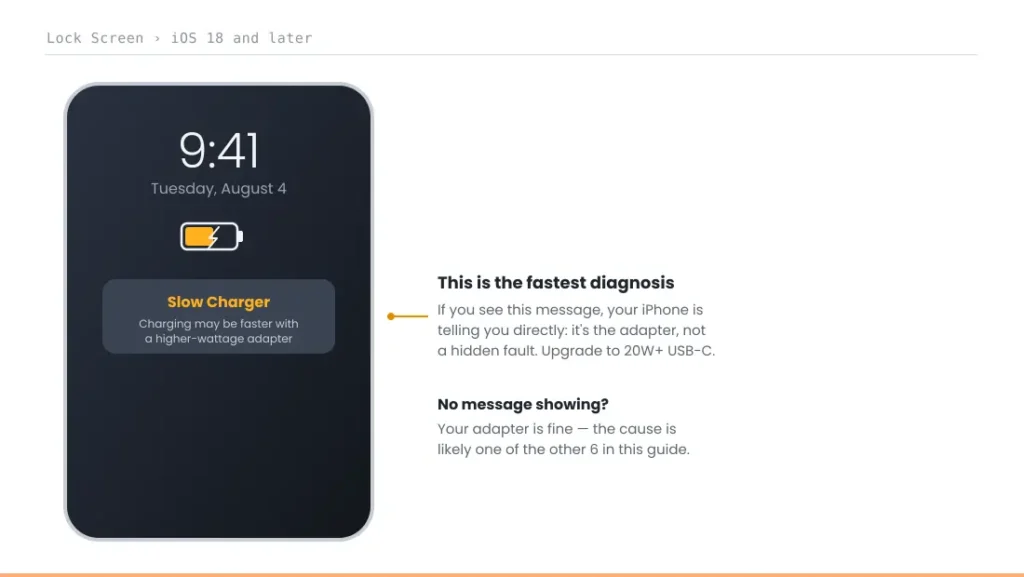
- iPhone charging slowly? Check your Lock Screen first — iOS 18+ shows an actual “Slow Charger” message if your adapter is the cause.
- Most common cause: a low-wattage adapter. iPhone 16 and earlier need at least 20W USB-C to fast charge at all.
- Shared ports (car, USB hub) and power pass-through accessories can both silently reduce the power reaching your iPhone.
- Heavy apps running while charging directly compete for power and slow the net charging rate.
- Wireless charging is inherently slower than wired — not a fault, just how it works.
Free Tool
Is your charger the problem? Check if it’s Slow, Normal, Fast or Optimal for your iPhone.
Why Is My iPhone Charging So Slow?
Usually because your adapter can’t supply enough power. iPhone 16 and earlier need at least a 20W USB-C Power Delivery adapter to fast charge, and most iPhone 17 models charge fastest with 40W or more. If your adapter is fine, the next suspects are a shared port, apps running while you charge, heat, or a weak wireless charger, covered below in the order they usually turn out to be the cause.
Check for This First — The “Slow Charger” Message
Before troubleshooting anything else: plug your iPhone in and check the Lock Screen. According to Apple’s own support documentation, iOS 18 and later will display a “Slow Charger” message directly on the Lock Screen if a higher-wattage charger would meaningfully improve your charging speed. If you see this, the fix is immediate and certain — you need a better adapter, not more troubleshooting.
7 Real Causes of iPhone Charging Slowly, Ranked
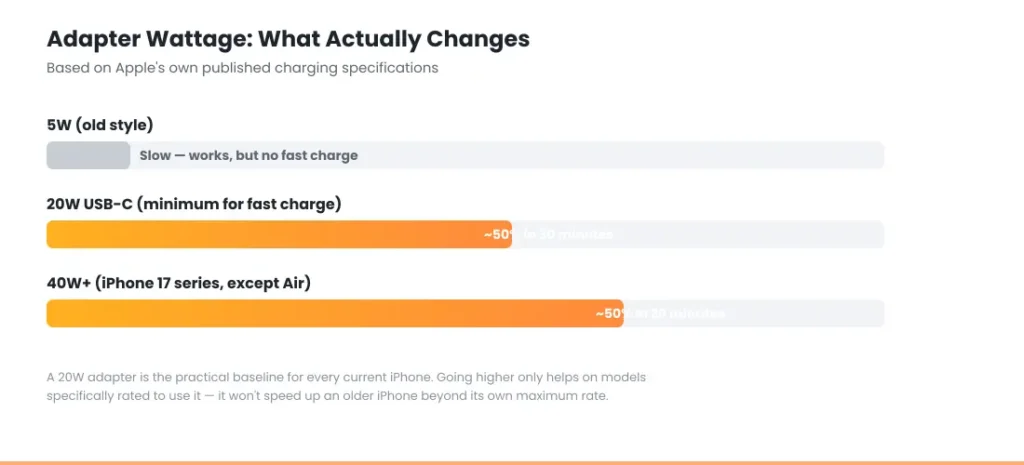
1. A low-wattage adapter. By far the most common cause of iPhone charging slowly. Apple’s official guidance is that iPhone 16 and earlier need at least a 20W USB-C power adapter to fast charge at all; the iPhone 17 series (except iPhone Air) can reach 50% in 20 minutes specifically with a 40W or higher adapter. An old 5W adapter will charge your iPhone, just very slowly — that’s expected behavior, not a fault.
2. A shared or underpowered port. Charging from a USB hub, a car’s USB port, or a multi-port wall adapter with other devices connected can all reduce the power your iPhone actually receives — the available power gets divided across whatever’s drawing from the same source.
3. A power pass-through accessory in the chain. If you’re charging through an adapter that also needs to power something else (like a USB-C Digital AV Multiport Adapter driving a display), it may reserve power for that device first, leaving less for your iPhone.
4. Apps running while you charge. Heavy apps — games, GPS navigation, video calls — draw power at the same time your phone is trying to charge, which directly slows the net charging rate. If you need your iPhone to charge fast, closing these temporarily makes a real difference.
5. Temperature putting charging on hold. Apple’s iPhones pause charging temporarily in extreme heat or cold, resuming once the battery returns to its normal operating range. Check Settings → Battery to see if charging was recently on hold for this reason.
6. Wireless charging limitations. Wireless charging is inherently slower than wired charging, and a weak Qi charger, poor MagSafe alignment, or a thick case can slow it further still. For the fastest wireless option, Apple specifically recommends a MagSafe Charger or a Qi2-certified charger. If you’re not sure which standard your charger actually supports, see Qi2 vs MagSafe iPhone for the full breakdown.
7. Degraded battery health. If Maximum Capacity has dropped significantly, charging behavior can become inconsistent — slower charging, unexpected percentage jumps, or both. See our guide on iPhone Battery and Charging Problems for how to check this, or get an instant verdict with our Battery Health Checker.
Not actually slow: it’s stopping at 80%. If charging seems to stall around 80%, check Settings → Battery → Charging. Optimized Battery Charging can hold at 80% until closer to when you usually unplug, and the 80% Limit option stops there by design. That’s battery protection, not a slow charger.
The Right Charger and Cable Setup
For the fastest realistic wired charging: a USB-C Power Delivery adapter, 20W minimum, paired with a USB-C cable for iPhone 15 and later, or a USB-C-to-Lightning cable for iPhone 14 and earlier. If your iPhone isn’t charging at all rather than just slowly, that’s a different issue — see our full guide on iPhone Not Charging When Plugged In.
Estimate how long your iPhone will take to reach full charge.
Open the full iPhone Charging Time Calculator →
🔌 Recommended Gear for Faster, Safer Charging
As an Amazon Associate we earn from qualifying purchases.
Apple 20W USB-C Power Adapter
The exact minimum wattage this guide recommends — official, safest compatibility. $14.99.
Apple USB-C to Lightning Cable (1m)
For iPhone 14 and earlier — rules out a worn or uncertified cable. $19.00.
Apple USB-C to USB-C Cable (2m)
For iPhone 15 and later — the correct connector for USB-C iPhones. $24.00.
Anker Nano Smart Display Charger, 45W
Faster ceiling for iPhone 17/16, plus a Care Mode that reduces charging heat — the actual factor behind long-term battery wear. $25.99.
Match Your Situation
If iPhone charging slowly is still happening after checking your Lock Screen, use this table to match your exact symptom to the right fix.
| Symptom | Likely cause | What to do |
|---|---|---|
| Lock Screen shows "Slow Charger" | Underpowered adapter | Upgrade to 20W+ USB-C PD adapter |
| Charges fine at home, slow in the car | Shared/underpowered port | Use a dedicated wall adapter instead |
| Slow specifically while gaming or navigating | Apps competing for power | Close heavy apps while charging |
| Slow only outdoors in hot/cold weather | Temperature pause | Move to room temperature; check Settings → Battery |
| Wireless charging feels slow | Qi limitations, misalignment, or case | Try MagSafe or remove thick case |
| Slow charging plus reduced Battery Health | Aging battery | See our Battery and Charging guide |
A note on scope: this guide covers charging speed, not charging failure. If your iPhone isn't charging at all, see iPhone Not Charging When Plugged In instead. And if you notice any physical swelling, that's a separate, more urgent issue — stop and see the safety guidance in our main iPhone Battery and Charging Problems guide.
RECOMMENDED FIRST STEP
Check your Lock Screen right now
If iPhone charging slowly is your issue, iOS 18+ will tell you directly whether your charger is the cause — no guesswork needed.
See the Full Battery & Charging GuideFeatured Apple Deals on Amazon
Current discounts on AirPods, chargers, cables, and other Apple gear.
Frequently Asked Questions
Why is my iPhone charging slowly all of a sudden?
Most often a change in your setup — a different outlet, a shared port, a new case affecting wireless alignment — rather than the phone itself. Check for the iOS 18 "Slow Charger" Lock Screen message first.
Does the iPhone Slow Charger message actually mean something's wrong?
No — it means your current adapter is safe but underpowered for the fastest charging your model supports. It's informational, not a warning about a fault.
Can I use my iPad charger to charge my iPhone faster?
Yes — any USB-C Power Delivery charger of sufficient wattage works safely with iPhone, regardless of whether it was originally sold for iPad.
Does a case slow down wireless charging?
It can, particularly a thick or non-MagSafe-compatible case that affects alignment or adds distance between the coils. This doesn't affect wired charging.
Is wireless charging always slower than wired?
Generally yes — this is expected behavior built into how wireless charging works, not a sign of a problem, though a MagSafe or Qi2-certified charger narrows the gap.
Should I close all my apps every time I charge?
Not necessary for normal charging — only heavy apps (games, GPS, video calls) meaningfully compete for power. Casual use has minimal impact on charging speed.
Why does my iPhone stop charging at 80%?
Optimized Battery Charging or the 80% Limit is turned on. Both are intentional and help protect the battery. You can change them in Settings → Battery → Charging.
Is slow charging bad for my iPhone battery?
No. Charging slowly doesn't harm the battery. Heat is what wears batteries faster, and slower charging produces less of it. It's only a problem when your iPhone charges more slowly than your adapter and cable should allow.
📚 Related Guides
- iPhone Battery and Charging Problems: The Complete Guide
- Free Charging Speed Cheat Sheet: What Wattage Your iPhone Needs
- iPhone Not Charging When Plugged In: Full Troubleshooting Guide
- iPhone Charging Port Not Working: Cleaning & Repair Guide
- iPhone Battery Drains Overnight: Real Causes & Fixes
- iPhone Dies at 20 Percent (Even Though It Says It's Charged)
- iOS 26.6 Battery Drain: Quick Fix & What's Happening
- Home and Lock Screen Battery Drain: 5 Real Causes
- Accessory Not Supported iPhone: 6 Proven Fixes
- Slow Charger Message on iPhone? 5 Proven Fixes
- Qi2 vs MagSafe iPhone: 4 Standards, One Clear Solution
- iPhone gets hot wireless charging
Written by S M Momin Arif
Founder and lead writer at iPhoneFixDaily, covering iPhone battery and charging diagnostics based on direct hands-on testing. Read more about our approach →