If your iPhone is showing a Slow Charger Message on iPhone under the battery icon or in Settings, you’re not imagining it — this is a real, named alert Apple added specifically to flag underpowered charging, and it’s become far more visible since iOS 26. Here’s exactly what triggers it, the real causes ranked by likelihood, and how to actually fix it.
Official Apple Store on Amazon
Genuine cases, cables, and accessories — sold and shipped by Apple.
🎧 LISTEN TO THIS GUIDE
~90 sec listen
📋 Quick Summary
- Slow Charger Message on iPhone is a real, named Apple alert — not a sign of damage.
- It triggers below roughly 7.5W wired or 10W wireless — well under what modern iPhones can accept.
- Became far more visible with iOS 26, which is why more people are noticing it now.
- The most common cause: a leftover USB-A or original 5W adapter.
- Even the official MagSafe Battery Pack triggers this message — it’s not accessory-specific.
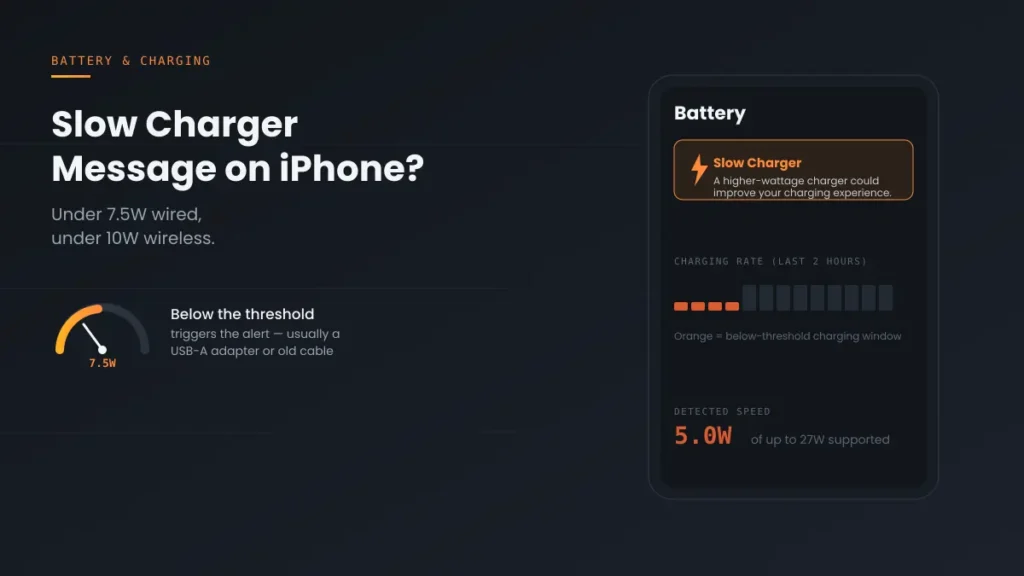
Slow Charger Message on iPhone is a system-level alert, not a bug or a sign of damage. It shows on your Lock Screen and under Settings → Battery, sometimes highlighted in orange on the charging graph, whenever your iPhone detects it’s receiving less power than it’s capable of using. It was introduced in iOS 18 and became significantly more visible on the Lock Screen with iOS 26, which is why more people are noticing it now even though the underlying detection has existed for a while.
What Actually Triggers This Message
According to Apple’s own support documentation, this message appears specifically when a higher-wattage charger could improve your charging experience, and it doesn’t mean anything is wrong with your iPhone or charger. The specific thresholds: Slow Charger Message on iPhone typically appears below roughly 7.5 watts over a wired connection, or below roughly 10 watts wirelessly — well under what modern iPhones can actually accept.
See if your charger meets Apple’s recommended wattage.
Open the full iPhone Charger Wattage Checker →
5 Real Causes, Ranked by Likelihood
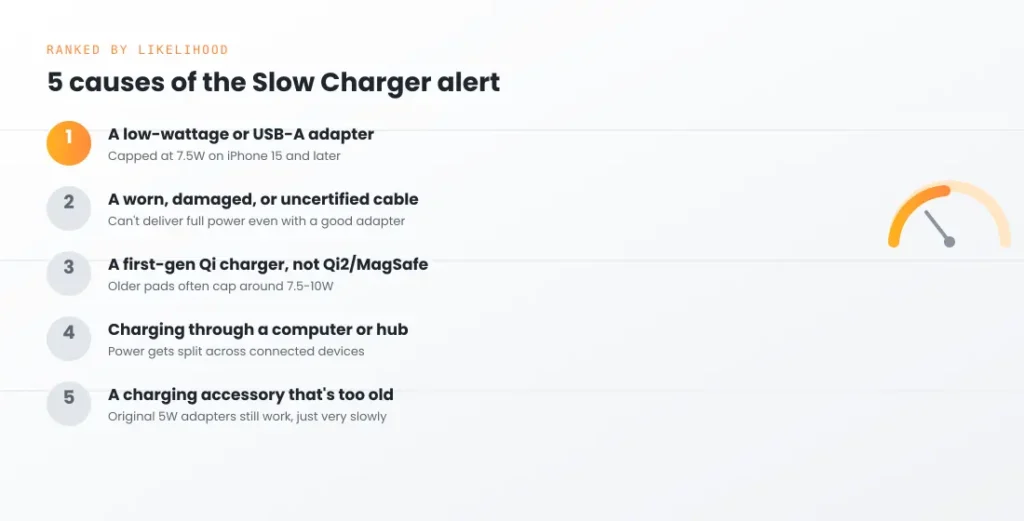
- A low-wattage or USB-A adapter. The single most common trigger. Apple's own documentation confirms that with a USB-A charger, iPhone 15 models and later will charge at a maximum of 7.5W, which sits right at the threshold that triggers this alert.
- A worn, damaged, or uncertified cable. Even a good adapter can't deliver full power through a cable with internal damage, a loose connector, or one that simply isn't rated for higher wattage.
- A first-generation Qi wireless charger instead of Qi2 or MagSafe. Older Qi1-era wireless pads, including ones marketed as "15W," often only deliver around 7.5-10W to an iPhone specifically, which is enough to trigger the same alert as a weak wired connection. For the full breakdown of what each wireless standard actually delivers, see Qi2 vs MagSafe iPhone.
- Charging through a computer, hub, or multi-port adapter. Splitting power across multiple connected devices, or charging via a USB port on a laptop, commonly delivers well under the wattage a dedicated wall adapter provides.
- A charging accessory that's simply too old. Original 5W adapters that shipped with older iPhone models are far below the threshold modern iPhones are built to accept, even though they still technically work.
Step-by-Step Fix Order
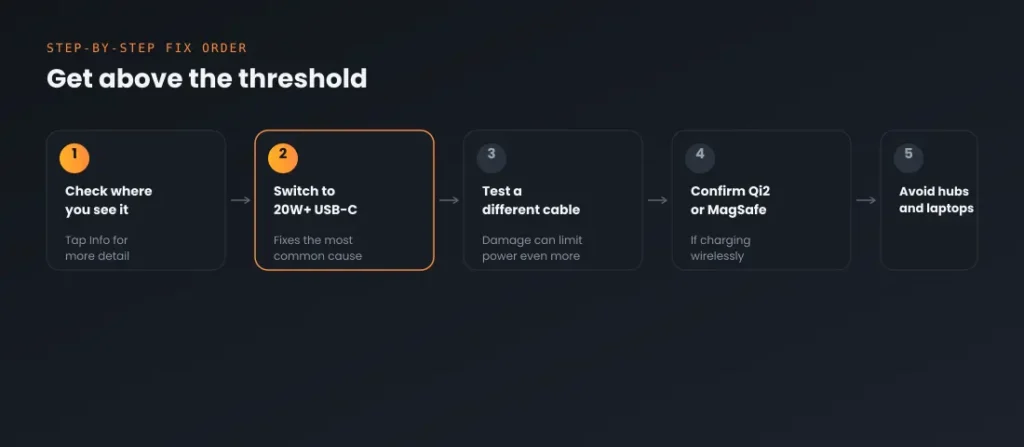
- Check exactly where you're seeing Slow Charger Message on iPhone — the Lock Screen, or Settings → Battery — and tap the Info button next to it if available, since Apple's own interface sometimes explains the specific cause detected.
- Switch to a genuine 20W or higher USB-C power adapter if you're currently using a USB-A charger or anything below that wattage.
- Test with a different, known-good USB-C to Lightning or USB-C to USB-C cable, since a damaged cable can trigger this even with a capable adapter.
- If charging wirelessly, confirm your pad is actually Qi2 or MagSafe-certified, not just marketed as "fast" — official MagSafe accessories and Qi2 support up to 25W, versus roughly 7.5-10W on older Qi1 pads.
- Avoid charging through a computer USB port, hub, or multi-port adapter shared with other devices if you need full charging speed — plug directly into a dedicated wall outlet instead.
Match Your Situation
| Symptom | Likely cause | What to do |
|---|---|---|
| Using an old USB-A charging brick | Capped at 7.5W on iPhone 15 and later | Switch to a 20W+ USB-C adapter |
| Cable feels loose, frayed, or is uncertified | Not delivering full rated power | Test with a different certified cable |
| Charging wirelessly on an older pad | Qi1 pad capped around 7.5-10W | Upgrade to Qi2 or official MagSafe |
| Charging via laptop or a shared hub | Power split across multiple devices | Use a dedicated wall adapter instead |
| Still using the original 5W adapter | Well below modern charging thresholds | Upgrade to at least 20W |
A note on scope: this guide covers the named Slow Charger Message on iPhone specifically. If charging feels slow but you're not seeing this exact alert, the causes may be different — see iPhone Charging Slowly for a broader diagnostic. If your iPhone isn't charging at all, that's a separate issue covered in iPhone Not Charging When Plugged In.
Recommended First Step
Check your adapter's actual wattage first
Slow Charger Message on iPhone is triggered below 7.5W wired or 10W wireless — a leftover USB-A or 5W adapter is the single most common cause. Check the fine print on your brick before troubleshooting anything else.
See the Full Battery & Charging GuideFeatured Apple Deals on Amazon
Current discounts on AirPods, chargers, cables, and other Apple gear.
Frequently Asked Questions
Does Slow Charger Message on iPhone mean my charger or iPhone is damaged?
No. Apple's own documentation states this directly — it simply means your current setup isn't delivering the maximum charging speed your device supports, not that anything is faulty.
Why am I only seeing this message now if I've used the same charger for a while?
The detection itself has existed since iOS 18, but iOS 26 made it significantly more visible by displaying it prominently on the Lock Screen rather than only inside Settings, so many people are noticing an existing situation for the first time.
Is Slow Charger Message on iPhone the same as a MagSafe Battery Pack showing this alert?
Yes — Apple's own documentation confirms the MagSafe Battery Pack itself will show a Slow Charger message, since it's designed around a lower wattage than a wall adapter, not a defect specific to that accessory.
Do I actually need fast charging, or can I ignore this message?
If you charge overnight and rarely need a quick top-up, this message is largely informational and safe to ignore. It matters more if you regularly need a fast partial charge during the day.
Will using a higher-wattage charger than my iPhone needs cause any damage?
No — iPhones negotiate the actual power they draw regardless of the adapter's maximum rating, so a 30W or 65W adapter charges an iPhone safely at whatever rate the device itself supports.
Can extreme temperature also trigger a slow charging message?
Yes, though through a different mechanism — Apple's documentation notes an iPhone may put charging on hold temporarily in extreme temperature conditions, which is separate from the wattage-based Slow Charger alert but can appear alongside it.
📚 Related Guides
This page may contain affiliate links. If you purchase through one, we may earn a commission at no extra cost to you. See our full Affiliate Disclosure for details.
Written by S M Momin Arif
Founder and lead writer at iPhoneFixDaily, covering iPhone battery and charging diagnostics based on direct hands-on testing. Read more about our approach →