
Latest status · Last checked November 18, 2026
Apple fix: None yet. Apple hasn’t acknowledged the problem
Are contacts deleted?: No. They’re still saved and you can scroll to them
Best workaround: search one contacts list instead of All Contacts
Latest iOS: iOS 27.2.1 (November 9, 2026), no Contacts fix listed. iOS 27.3 is due in December
iPhone contacts search not working after iOS 27? You type a name you know is saved and get nothing, the wrong people, or a result that shows up ten seconds later. Your contacts haven’t gone anywhere. Thousands of owners have reported the same thing since iOS 27 came out in September, and Apple hasn’t fixed it yet. There is a simple workaround that most people say works, plus a few other things worth trying, in the order below.
Table of Contents
Why iPhone Contacts Search Is Not Working After iOS 27
Owners describe three versions of the same problem in the Contacts app, and in the Contacts tab of the Phone app:
- Blank results: the search finds nobody, even for a name you can see when you scroll
- Wrong or partial results: some people show up, others don’t
- Slow search: results take 5 to 15 seconds to appear after you type
It hits hardest when you have a lot of contacts and more than one account feeding them, such as iCloud plus Gmail, Outlook or a work Exchange account, and you’re looking at All Contacts. Reports name the iPhone 13, 16 Pro, 16 Pro Max, 17 Pro and 18 Pro on iOS 27, 27.0.1 and 27.2. Several owners say Spotlight on the same iPhone, their iPad, or a third-party contacts app still finds the people the Contacts app can’t.
That pattern points at the combined All Contacts view rather than at your data. Apple hasn’t explained the cause or confirmed a bug. One volunteer on Apple’s forum said they couldn’t reproduce it, so not every iPhone is affected.
It isn’t a small problem, though. That Apple Community thread has nearly 1,000 “me too” votes since September 18. In India, a LocalCircles survey with more than 18,000 responses found 71% said yes when asked whether they had trouble reaching their contact list after updating to iOS 27 (Telangana Today, October 30).
6 Fixes for iPhone Contacts Search Not Working
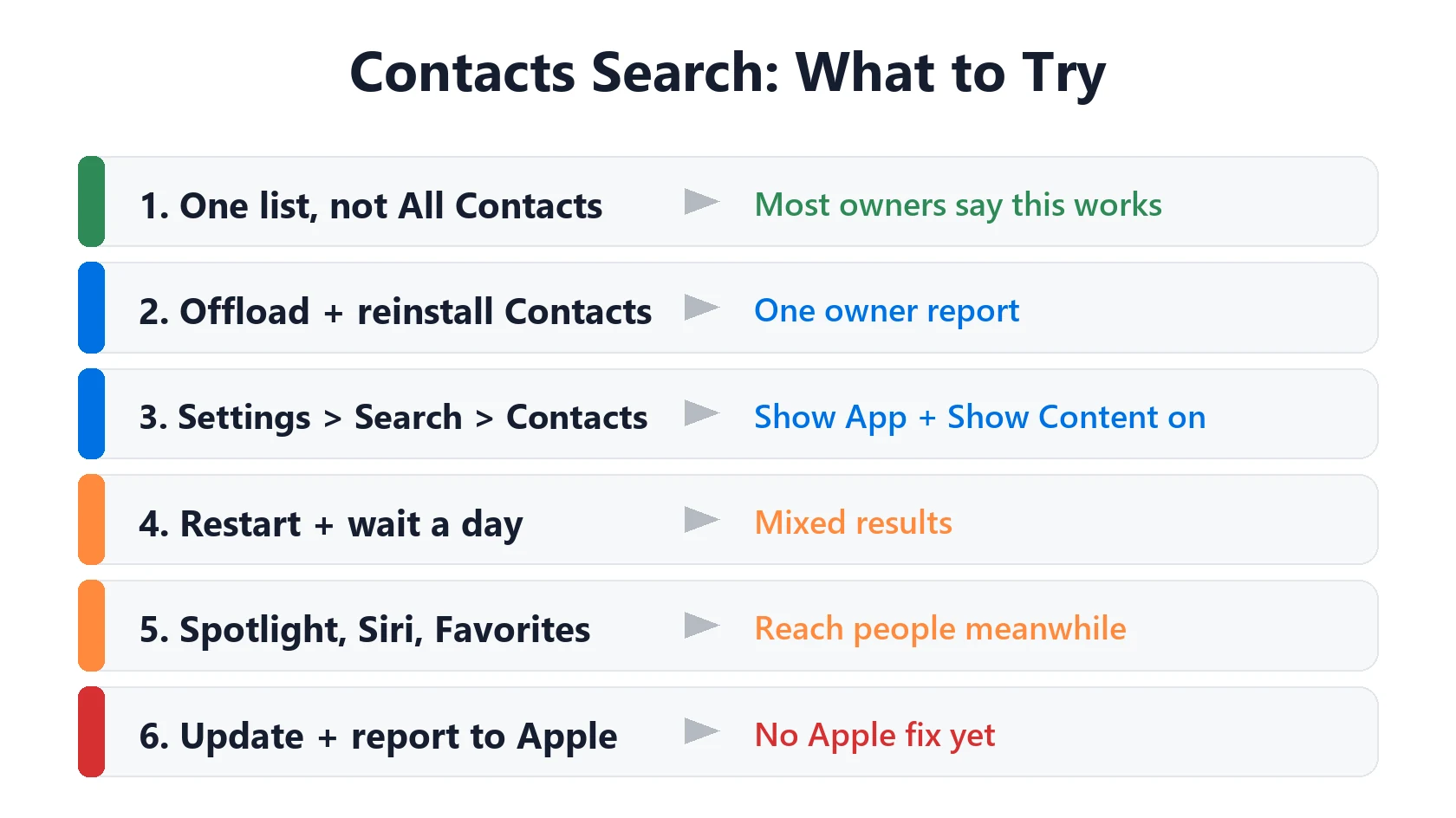
Try them in this order. The first one is the workaround most owners say works.
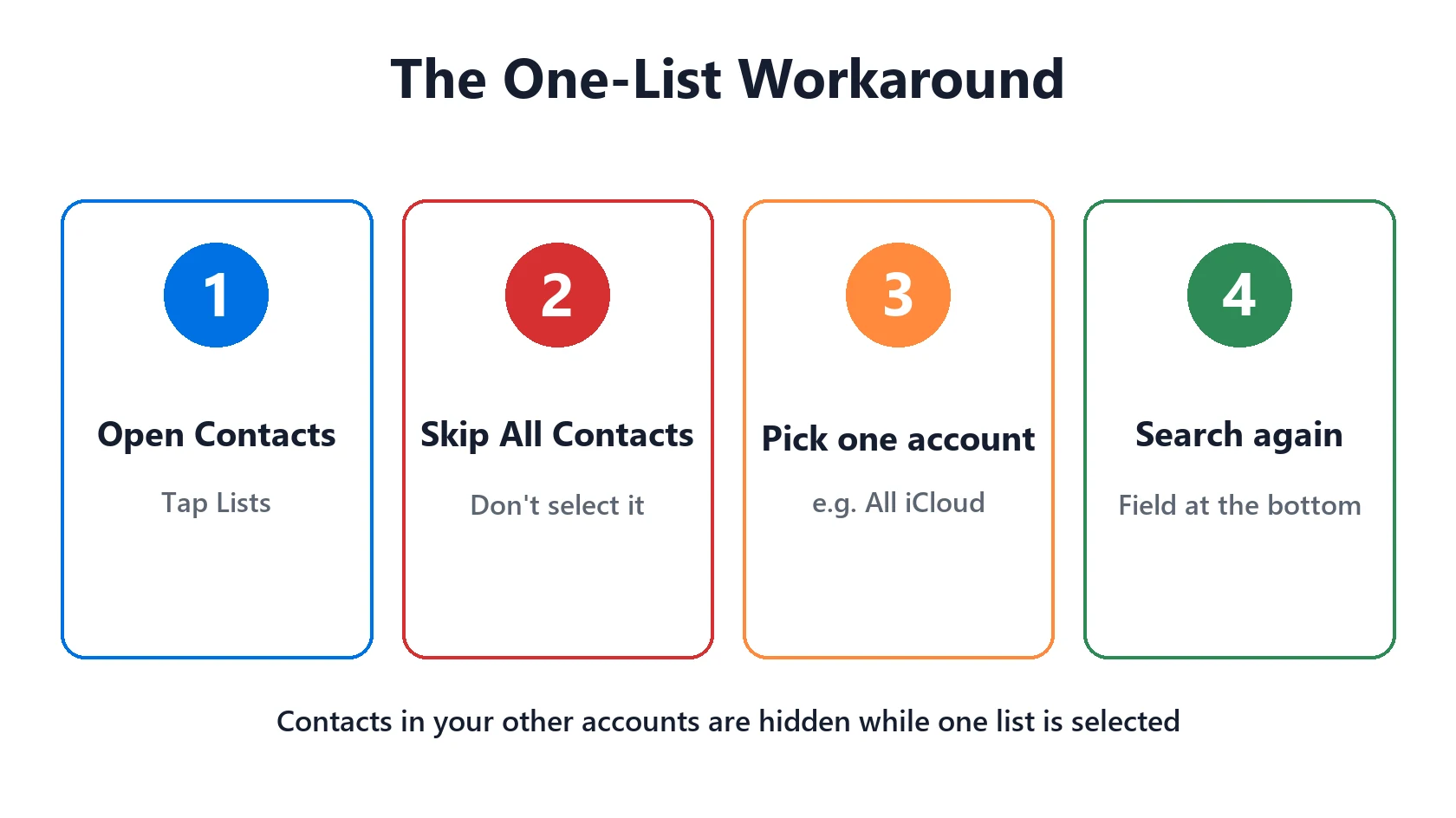
1. Search one contacts list instead of All Contacts
This comes from an iPhone 16 Pro Max owner with about 15,000 contacts who shared it on the MacRumors forums. Every reply that said whether it worked said yes, on an iPhone 16 Pro, a 16 Pro with 6,000+ contacts, and an 18 Pro.
- Open the Contacts app
- Tap Lists. If you can’t see it, pull down on the list and tap the back arrow
- Don’t tap All Contacts. Tap only the account that holds most of your contacts, such as All iCloud, Gmail or Exchange
- Search again from the search field at the bottom of the list
The catch: while one list is selected, contacts saved in your other accounts won’t show. If you have only one account, you won’t see a Lists button at all, and this fix doesn’t apply. Go to Fix 2. An owner who searched only a Google account also said search went from 5+ seconds to instant, so it can help with slow search too.
2. Offload and reinstall the Contacts app
One owner on Apple’s forum says this brought search back: go to Settings → General → iPhone Storage → Contacts, tap Offload App, wait about 20 seconds, then tap Reinstall App. Offloading removes the app but keeps its data, and your contacts are stored in your accounts anyway. If your iPhone doesn’t offer Offload App for Contacts, skip this one. It’s a single report, so treat it as worth a try rather than a sure fix.
3. Check that Contacts is allowed in Search
If people are missing from Spotlight (the search you get by swiping down on the Home Screen), check the search settings. Apple’s Spotlight guide says to go to Settings → Search, scroll to Contacts, and make sure Show App in Search and Show Content in Search are on. An owner on iOS 27.2 found Contacts had been excluded there, and once they turned it back on, their contacts “immediately started showing up in Spotlight again”. This fixes Spotlight. It may not fix the search box inside the Contacts app.
4. Restart and give it a day
A major update rebuilds the search index in the background, which can take a while on a big contact list. Restart the iPhone, leave it on Wi-Fi and charging overnight, then try again. A reader tracker says this has helped some owners. Be realistic, though. The MacRumors owner waited days, let the update finish optimizing, and restarted several times without any change, and another owner says a force restart “didn’t change anything”.
5. Reach people another way meanwhile
Until a fix arrives, these routes still work for most owners, according to their reports:
- Spotlight: swipe down on the Home Screen and type the name. Apple’s iPhone User Guide lists it as another way to search contacts
- Siri: “Call Mum” or “Text Alex” works without opening Contacts
- Favorites and Recents in the Phone app for the people you call most
- Search in Messages, Mail or WhatsApp, which use their own search
6. Update iOS and report it to Apple
Install the latest version from Settings → General → Software Update. iOS 27.2.1, released November 9, is the newest. Its notes only say “bug fixes and security updates” (MacRumors), and owners were still reporting the problem on iOS 27.2, so don’t expect it to fix search. Install it anyway for the security fixes (our iOS 27.2.1 guide covers what’s in it).
Then tell Apple. Bugs with more reports get attention. Contact Apple Support, and if you use the Feedback Assistant app, mention that others have cited Feedback ID FB24556221 for this issue. Say how many contacts and accounts you have, because that’s the pattern owners share.
What Owners Report
These are individual reports from Apple’s forum and MacRumors. Apple hasn’t confirmed them, and we haven’t reproduced them.
| iPhone | Contacts and accounts | What helped |
|---|---|---|
| iPhone 16 Pro Max (iOS 27) | About 15,000, mostly Exchange | Searching only the Exchange list (MacRumors) |
| iPhone 16 Pro (iOS 27.0.1) | 6,000+ | One list: “Your fix worked!!!” |
| iPhone 18 Pro (iOS 27) | Not given | One list |
| iPhone 16 Pro (iOS 27) | Google account | Searching only Google made it fast again |
| iPhone (iOS 27) | Not given | Offload, then reinstall Contacts (Apple Community) |
| iPhone (iOS 27.2) | Not given | Removing Contacts from the excluded-from-search list fixed Spotlight |
| iPhone 17 Pro (iOS 27) | Not given | About 10-second delay per search (report roundup). No fix given |
Most of these reports come from people with thousands of contacts, but the LocalCircles survey suggests people with ordinary contact lists are affected too.
What Not to Do
- Don’t erase or reset your iPhone for this. People in the forums suggested Reset All Settings and factory resets, but no owner reported that either one fixed search.
- Don’t turn off iCloud Contacts to “speed it up”. One owner says search got faster after turning off iCloud sync and keeping contacts on the phone. Changing sync on a big contact list can create duplicates or leave changes stuck on one device. If you try it anyway, back up first (see iCloud backup failed if the backup won’t finish).
- Don’t delete your Exchange or Gmail account. The owner who found the one-list workaround says it isn’t needed.
- Skip paid “iOS repair” tools. Nobody in these reports says they helped. The problem is in iOS itself.
Will iOS 27.3 Fix Contacts Search?
There’s no sign of it yet. Apple hasn’t mentioned Contacts search in the notes for iOS 27.2 or 27.2.1, and none of the reports we found say the iOS 27.3 beta fixes it. Apple is expected to release iOS 27.3 in December (our iOS 27.3 beta page tracks it). We’ll update this page as soon as an update fixes it. Until then, the one-list workaround is the most reliable option. For other problems on the same update, see iOS 27.2 problems.
Frequently Asked Questions
Are my contacts deleted?
No. Owners can still scroll to every contact, and other apps and devices still find them. Only the search inside Contacts and Phone is failing.
Why does Spotlight find a contact when the Contacts app can’t?
Spotlight uses the system-wide search, while the problem appears to be in the Contacts app’s All Contacts view. That’s why searching one list, or using Spotlight or Siri, still works for most owners.
Does this affect iPad too?
Some owners see a milder version on iPadOS 27, but many say their iPad still searches normally.
Why is iPhone contacts search so slow on iOS 27?
Owners with large contact lists and several accounts see the longest delays. Searching a single account’s list is the workaround they report for slow search as well.
Did iOS 27.2.1 fix contacts search?
No. Its release notes don’t mention Contacts, and owners reported the problem on iOS 27.2. Install it for the security fixes and keep using the workaround.
Will resetting my iPhone fix contacts search?
There’s no report of a reset fixing it, and an erase takes hours to restore from backup. Try the one-list workaround instead.
Written by S M Momin Arif
Founder and lead writer at iPhoneFixDaily, writing practical iPhone troubleshooting guides checked against Apple’s official support documentation. Read more about our approach →


