Is your iPhone 16 Pro battery health dropping fast? Some owners report a 97% to 91% slide within weeks of light use — you’re not imagining it, and you’re not alone. Reports of unusually quick battery health decline on this specific model have shown up repeatedly on Apple’s own Community forums and MacRumors since launch. Here’s what’s actually normal wear for this model, what isn’t, and how to tell the difference on your own device.
Official Apple Store on Amazon
Genuine cases, cables, and accessories — sold and shipped by Apple.
📋 Quick Summary
- Apple designs iPhone 16 Pro’s battery to retain 80% capacity at 1,000 complete charge cycles — dropping several percent within your first few dozen cycles is faster than that curve suggests.
- iOS itself doesn’t report battery health in real time from day one — early readings can look more volatile before the system has enough cycle data to stabilize.
- Multiple owners specifically report faster-than-expected drops on this model, distinct from generic post-update drain complaints.
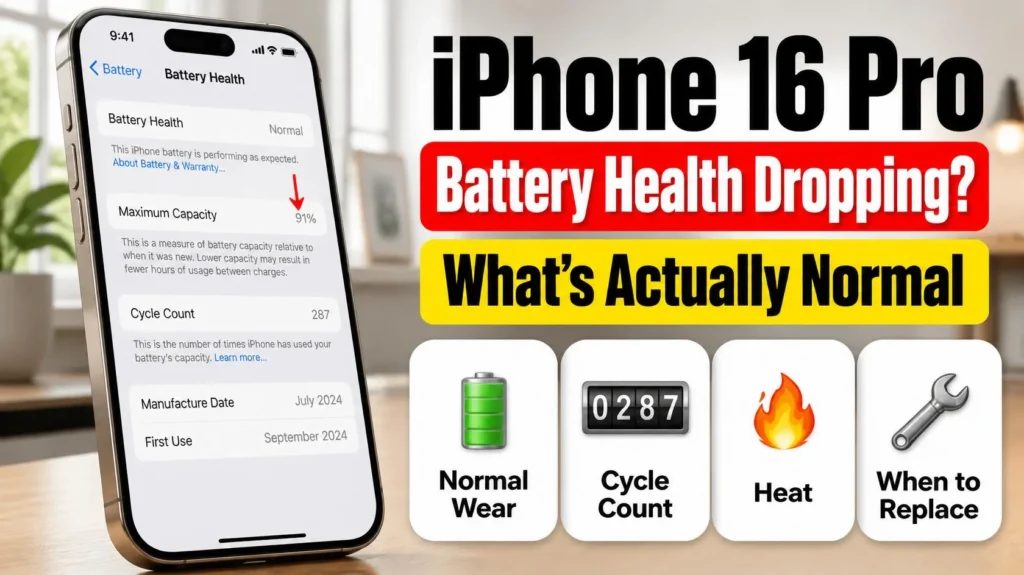
- Check Settings → Battery → Battery Health & Charging for your cycle count — health dropping quickly at a low cycle count is the strongest signal something’s off.
- Below 80% capacity is Apple’s own threshold for battery service eligibility, regardless of how many cycles it took to get there.
Table of Contents
iPhone 16 Pro Battery Health Dropping Fast? What’s Normal Wear
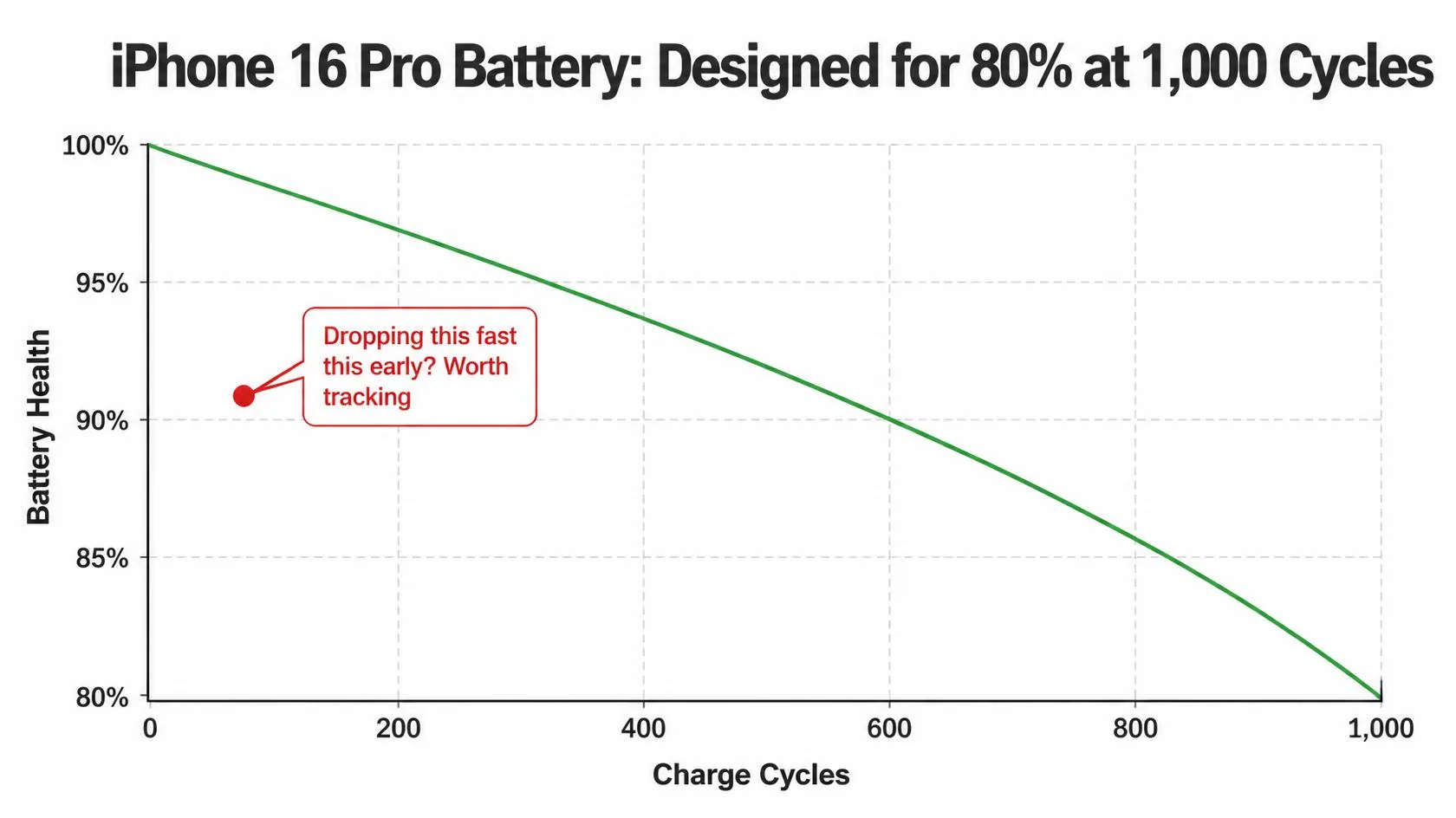
According to Apple’s own support documentation on iPhone battery and performance, iPhone 16 Pro’s battery is designed to retain up to 80% of its original capacity at 1,000 complete charge cycles under normal conditions — a full charge cycle being the equivalent of using 100% of your battery’s capacity, whether that’s in one day or spread across several. On that curve, losing even 1-2% of health in your first month or two of ownership, before you’ve come anywhere near a meaningful fraction of 1,000 cycles, is faster than the design target implies. That doesn’t automatically mean something is wrong, but it’s worth tracking rather than dismissing.
Why Early Readings Can Look Worse Than They Are
Battery health percentage isn’t a live voltage reading — it’s a modeled estimate iOS calculates from your charging history, and that model needs data to stabilize. Apple’s own documentation on battery health recalibration confirms that the reported percentage can shift, including upward, as the system gathers more charging cycles and refines its estimate — meaning an early dip reported after only a handful of cycles isn’t necessarily the final, settled number. This is a real mechanism, not just reassurance: it’s specifically why Apple built a recalibration process into iOS in the first place.
When It’s Genuinely Faster Than Normal
Recalibration noise explains small early fluctuations, but it doesn’t explain every report. Some iPhone 16 Pro owners have documented a steady, repeated decline — for example, dropping several percentage points over a small number of charge cycles, not a one-time jump that later corrects itself. A few specific patterns are worth checking if that matches what you’re seeing:
- Frequent fast wired or fast wireless charging. Repeatedly charging at high wattage generates more heat per session, and heat is the single biggest accelerant of lithium-ion battery wear.
- Charging or using the phone in hot conditions. Leaving it in direct sun, a hot car, or gaming heavily while plugged in all raise internal temperature during charging, which compounds wear faster than charging at room temperature.
- Keeping the phone at very high or very low charge for long stretches. Sitting at 100% for hours, or repeatedly running down near 0%, both add more stress than staying in a moderate range.
- A hardware or manufacturing outlier. Battery cells vary slightly unit to unit. A small percentage of any model will simply wear faster than the average, independent of how it’s used.
Check Your Cycle Count Before Deciding Anything
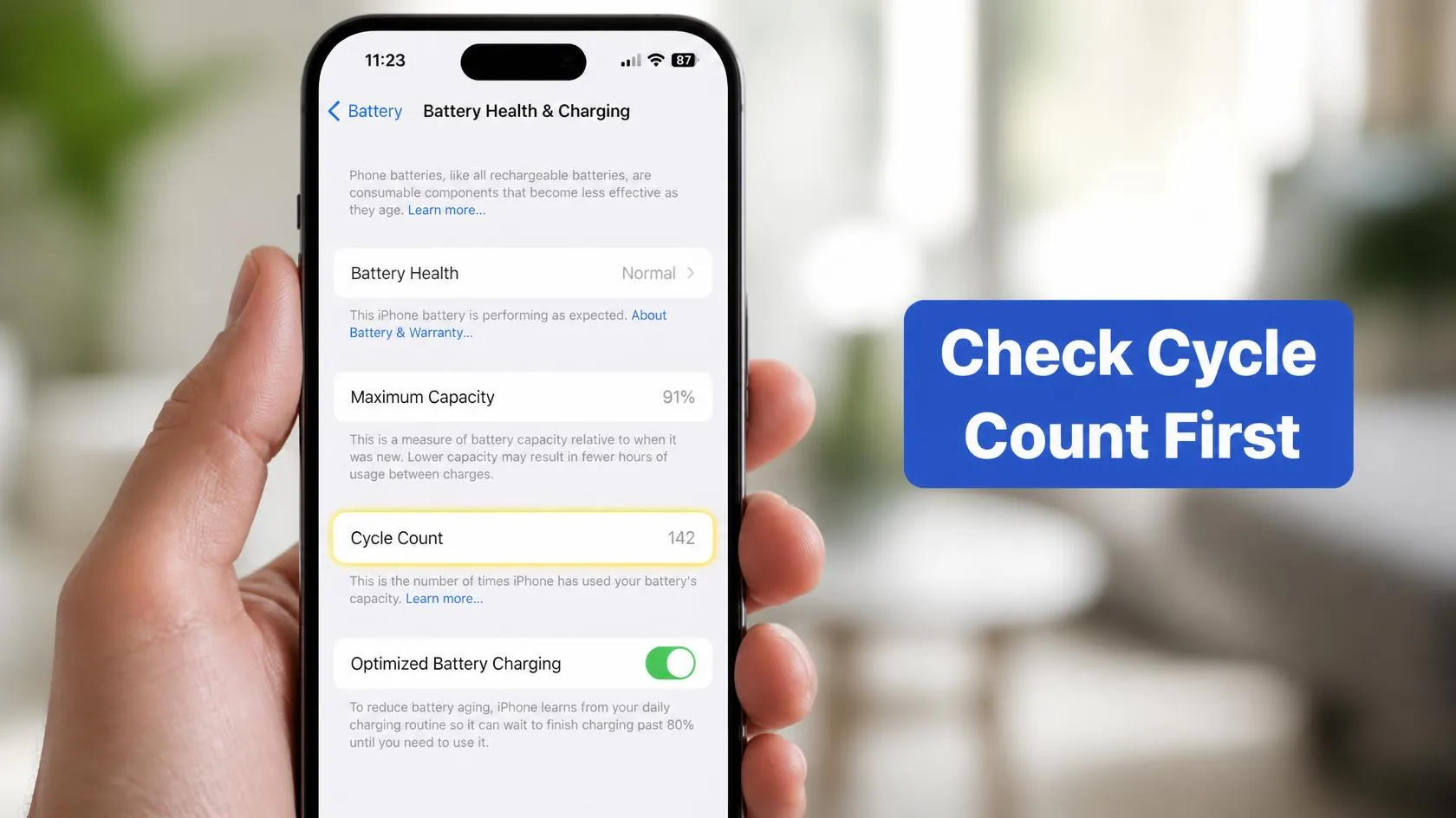
Battery health without cycle count is only half the picture. Go to Settings → Battery → Battery Health & Charging to see your current health percentage, and cross-reference it against how long you’ve owned the phone and roughly how many full charges you’ve done. A health reading in the low 90s after 300+ cycles is unremarkable. The same reading after 20-30 cycles, within the first month or two of ownership, is the pattern actually worth escalating to Apple.
Is iOS 26 Making This Worse?
Separately from long-term health decline, some iPhone 16 Pro owners have also reported noticeably worse day-to-day battery life specifically on iOS 26 compared with iOS 18 — that’s a battery drain complaint, not a health complaint, and the two get conflated often. If your battery health percentage itself is stable but your phone simply doesn’t last as long through the day as it used to, that’s a separate issue with its own causes — see iPhone Battery and Charging Problems for the full troubleshooting path. What this guide covers specifically is the reported Maximum Capacity number declining faster than expected, not runtime alone.
What to Do, In Order
- Check Settings → Battery → Battery Health & Charging and note both the percentage and, if visible, your approximate cycle count.
- Give it 2-3 more weeks of normal use — early recalibration noise resolves itself as iOS gathers more charging data.
- Review your charging habits: minimize very high-wattage fast charging every single session, and avoid charging in direct heat.
- Turn on Optimized Battery Charging in the same settings screen if it isn’t already — it slows the final charge to 100% specifically to reduce long-term wear.
- If the decline continues at a low cycle count after that window, contact Apple Support or visit an Apple Store — a battery genuinely wearing faster than spec, especially this early, is a legitimate case for a warranty conversation rather than something to just accept.
Not sure where your current number actually stands? Run it through our free Battery Health Checker for an instant read on whether your health percentage is normal for your phone’s age.
Match Your Situation
| Your situation | Likely cause | What to do |
|---|---|---|
| 1-2% drop in the first month, low cycle count | Normal recalibration noise | Keep using normally; recheck in a few weeks |
| Steady multi-percent drop over very few cycles | Possible fast-wear pattern or outlier unit | Review charging habits; contact Apple if it continues |
| Health stable, but daily battery life feels worse | Separate drain issue, not health decline | See the full Battery and Charging guide |
| Health below 80% at any point | Meets Apple’s own service threshold | Battery replacement is the direct fix |
| Frequent fast charging or hot-weather use | Heat-accelerated wear | Enable Optimized Battery Charging; reduce heat exposure |
A note on scope: this guide covers battery health percentage specifically. If your iPhone 16 Pro is shutting down unexpectedly rather than just showing a lower health number, see iPhone Dies at 20 Percent instead.
RECOMMENDED FIRST STEP
Check your cycle count, not just the percentage
Settings → Battery → Battery Health & Charging tells you the real story — a dip at 20 cycles means something very different than the same dip at 400.
Try the Free Battery Health CheckerFeatured Apple Deals on Amazon
Current discounts on AirPods, chargers, cables, and other Apple gear.
Frequently Asked Questions
Is it normal for iPhone 16 Pro battery health to drop fast in the first few weeks?
A small early dip is often recalibration noise as iOS gathers more charging data, but a repeated, steady decline over very few charge cycles is faster than Apple’s own 1,000-cycle design target and worth monitoring closely.
Will my battery health number go back up on its own?
It can — Apple’s own documentation on recalibration confirms the reported percentage can adjust, including upward, as iOS refines its estimate with more charging history. It’s not guaranteed, but an early dip isn’t necessarily final.
How many charge cycles is too many for a new iPhone 16 Pro to already show wear?
There’s no official Apple cutoff, but a health drop of several percent within your first 20-30 cycles is the kind of pattern worth raising with Apple Support rather than assuming is normal.
Does fast charging damage iPhone 16 Pro’s battery faster?
Not inherently, but the added heat from repeated high-wattage sessions is a genuine long-term wear accelerant. Occasional fast charging is fine; making it your only charging method adds up over time.
Is this the same issue as general iOS 26 battery drain?
No — battery drain affects how long a charge lasts day to day, while this guide covers the Maximum Capacity health percentage itself declining faster than expected. They can coexist but have different causes and different fixes.
Will Apple replace my battery for free if health drops fast early on?
If your iPhone 16 Pro is still under its standard one-year warranty or AppleCare+, and Apple determines the battery is defective rather than simply worn, replacement is typically covered. This is a case worth raising directly with Apple Support rather than assuming you’ll have to pay.
📚 Related Guides
Written by S M Momin Arif
Founder and lead writer at iPhoneFixDaily, covering iPhone battery and charging diagnostics based on direct hands-on testing. Read more about our approach →